How to Choose the Best Leather Office Chairs?
Choosing the best Leather Office Chairs involves more than matching a polished surface to a modern desk. The right chair must support your body, suit your working habits, and withstand daily use. OSHA’s Computer Workstations eTool recommends adjustable seating, lumbar support, and feet resting comfortably on the floor. These details matter during long writing sessions, video calls, and spreadsheet work.
Leather also requires careful evaluation. Full-grain leather usually shows natural markings and develops a deeper patina over time. Bonded leather may look consistent, but its surface can wear sooner under heavy use. The material is only one part of the decision. Check the chair’s seat depth, backrest angle, armrest height, recline mechanism, and base stability. ANSI/BIFMA X5.1 establishes performance and safety tests for general-purpose office chairs, including durability and stability. Look for test compliance, not vague claims such as “executive quality.”
Market research shows why buyers face so many choices. Grand View Research reports continued growth in the global office furniture market, driven partly by changing workplace models and home-office demand. More options do not guarantee better ergonomics. That assumption is easy to make. A thick cushion may feel luxurious for ten minutes, then create pressure behind your knees. A glossy finish may photograph well, yet feel warm and slippery in daily use. The best Leather Office Chairs balance comfort, adjustability, construction, and maintenance. Even expert guidance has limits; body shape, desk height, and working posture differ. Test the chair when possible, and reconsider any purchase that ignores those practical details.
What Defines a High-Quality Leather Office Chair?
How to Choose the Best Leather Office Chairs?
What Defines a High-Quality Leather Office Chair?
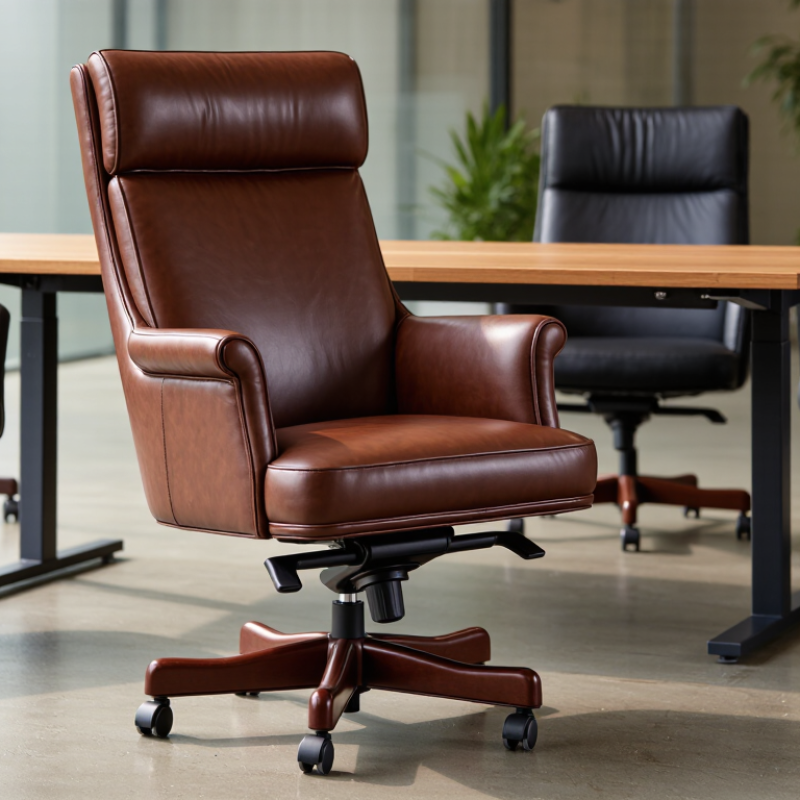
High-quality leather begins with honest material details. Full-grain leather usually keeps its natural texture and develops character through use. Top-grain leather feels smoother, but heavy surface treatment may reduce its breathability. Ask what covers the seat, backrest, and armrests. Some chairs use leather only on contact areas. Look underneath.
Run your hand across the surface. It should feel supple, not plastic-like or excessively glossy. Small variations can indicate genuine material, although appearance alone proves little. Check the stitching for even spacing and tight threads. Loose seams often become visible after months of daily use. Details matter.
The internal structure matters just as much. A strong metal base, stable tilt mechanism, and height adjustment support safer, longer use. Dense foam should recover after pressure without feeling hard. Test the chair for at least ten minutes. Your lower back should feel supported, while your feet remain flat. Armrests should let your shoulders relax. Not every expensive chair fits every body.
Reliable sellers should provide material specifications, weight limits, adjustment ranges, and warranty terms. These details are more useful than vague claims about luxury. Smell can help, but it is not proof of quality; strong odors may come from adhesives or finishes. I would also inspect the underside, where rushed construction is easier to notice. A flawless surface is not always better. Natural marks may be acceptable, but deep cracks, uneven padding, and unstable movement deserve careful thought.
How to Match Chair Features with Your Work Needs
Choosing a leather office chair starts with your work pattern, not its appearance. If you type for eight hours, prioritize adjustable seat depth, lumbar support, and armrests. Your elbows should rest near 90 degrees, while your feet stay flat on the floor. A practical fitting test helps: sit fully back, then place two fingers behind your knees. Too little space creates pressure. Too much reduces support.
For meetings, reading, or frequent calls, a reclining backrest and breathable leather surface may matter more. A seat tilt mechanism can reduce static posture during long sessions. The Occupational Safety and Health Administration recommends adjustable seating that supports the lower back and allows comfortable workstation alignment. That guidance is useful, but it is not a complete buying formula. Leather may feel durable, yet poor cushioning can become uncomfortable by mid-afternoon.
Stress also affects how people sit. Gallup’s State of the Global Workplace 2024 report found that 41% of employees experienced significant stress the previous day. A supportive chair cannot solve workload problems, but it can remove one physical distraction. Check the adjustment range, not just the feature list. A chair with ten functions may still fit badly. I have seen attractive executive chairs encourage rigid sitting. That is an easy detail to miss. Choose the features matching your movements, body size, and daily schedule.
Which Leather Types and Upholstery Options Should You Compare?
Choosing the best leather office chair begins with comparing the leather itself. In my experience, leather names can sound more precise than they are. Full-grain leather keeps natural markings and usually develops a richer surface over time. Top-grain leather is lightly corrected, making it smoother and more uniform. Corrected-grain leather receives extra finishing to hide scars or color differences. Bonded leather contains leather fibers mixed with synthetic materials, so it often costs less but may age differently. Ask for the exact material specification, not just “premium leather.”
For daily office use, durability and comfort should be judged together. A chair with genuine leather on the seat and synthetic upholstery on the sides can be practical. Check this detail carefully. Some sellers describe the entire chair as leather, although only the contact areas use it. Request abrasion ratings, finish details, and warranty terms when available. Leather can still feel cold in the morning and warm after long meetings.
Upholstery construction also matters. High-resilience foam should support your hips without feeling like a hard block. Layered foam can reduce pressure across the seat. Look for tight, even stitching around the backrest and armrests. Loose seams invite early wear. I once preferred a softer cushion, but it compressed faster than expected. That changed my view. Sit for at least ten minutes before deciding. Notice pressure beneath your thighs, slipping fabric, and heat across your back. A lower price may be reasonable, but only when the material and internal construction are clearly disclosed.
How to Check Durability, Maintenance, and Overall Value
A leather office chair should survive years of daily sitting, not just impress in a showroom. Check the leather closely. Full-grain leather usually develops character, while corrected leather may resist stains more evenly. Run your hand across the surface. It should feel consistent, not excessively thin or plastic-like. Inspect the stitching around the seat, backrest, and armrests. Tight, even stitches suggest better control during manufacturing. The frame also matters. A solid metal or reinforced wood structure usually handles repeated movement better than a weak, flexible base.
Maintenance affects durability as much as material quality. Wipe dust away weekly with a soft, dry cloth. Clean spills immediately, especially coffee or oily food. Use a leather cleaner only after testing it beneath the seat. Avoid soaking the surface. Too much moisture can damage the finish and weaken seams. Keep the chair away from direct sunlight and heaters, which may cause fading or cracking. Small scratches can become larger tears.
Overall value includes comfort, repairability, and long-term support. Sit for at least fifteen minutes before buying. Notice pressure under your thighs and lower back. A smooth recline mechanism should move without grinding or sudden drops. Replaceable casters, arm pads, or gas lifts can extend the chair’s useful life. I once chose a cheaper chair because it looked similar. Its cushioning flattened quickly. That mistake changed my view of price. Still, expensive leather does not guarantee lasting quality, so inspect every component and read the care requirements carefully.
How to Choose the Best Leather Office Chairs?
Compare common upholstery materials across durability, maintenance ease, and overall value. Scores use a practical 1–10 benchmark based on typical wear resistance, care requirements, repairability, and expected service life.
Buying guide: Full-grain leather generally offers the strongest long-term durability, while top-grain leather provides a balanced combination of comfort, appearance, and value. Bonded leather is usually more affordable but may have a shorter service life. Synthetic leather is easy to clean and suitable for buyers who prioritize low maintenance.